

Toca Boca Jr
Play Piknik
I spent time with Toca Boca Jr as a children’s game rather than treating it like a simple collection of mini-games. Its main appeal is that it gives young children room to explore and make choices without demanding that they follow one fixed path. That makes it especially interesting for families thinking about readability, motor control, sensory comfort, and how a game works in everyday situations.
Play Piknik is the developer, and the game sits in the educational category. It is aimed at children from two to eight, with an Everyone age rating, and the basic download is free. The wider experience includes optional in-app purchases ranging from $7.99 to $79.99 per item, so the word “free” needs a little context when an adult is deciding how it fits into a child’s routine.
My overall impression is positive but not uncritical. The playful design can support independent discovery, pretend play, and simple problem-solving, yet its open-ended nature will not suit every child. Some children benefit from freedom; others need clearer goals, quieter presentation, or more predictable instructions. That difference is central to deciding whether this is a good choice.
How the interface reads to young players
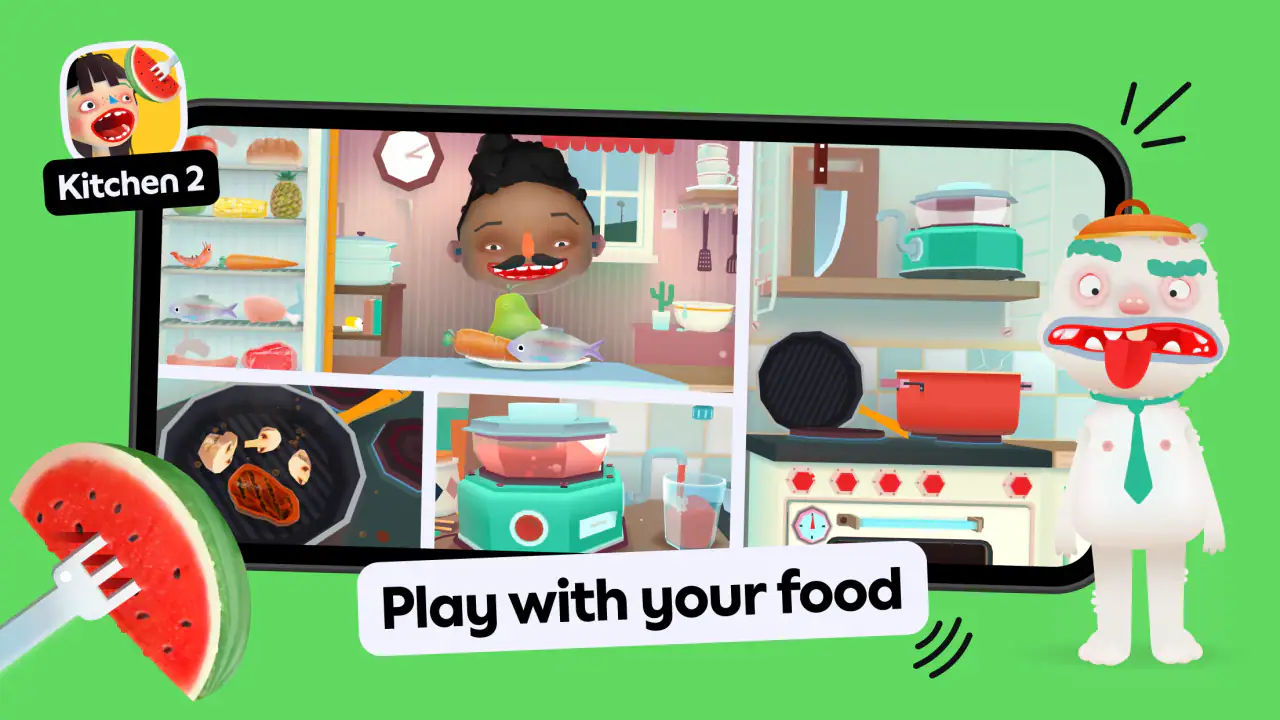
The first strength I noticed is the visual language. The game is built for children who may not read confidently, so the experience relies heavily on recognizable pictures, direct manipulation, and immediate visual feedback. A child can often understand what to touch by looking at the scene rather than decoding a long instruction. For early learners, that lowers the reading burden and lets them participate before they can read independently.
That does not mean every child will find it effortless. A two-year-old and an eight-year-old approach the same screen very differently. The younger child may tap randomly, repeat an action, or need an adult to demonstrate the first interaction. An older child may quickly understand the pattern and want more challenge. The broad age range is useful for families with siblings, but it also means the experience cannot be equally deep for every stage.
Related News

Why WhatsApp Messenger Still Makes Everyday Communication Feel Easy

Jurassic World: The Game Is the Better Dino Tycoon for Strategic Players

Threads in Real Life: Who Should Join, Lurk, or Leave

How SHEIN Turned Shopping Into an Endless Content Feed

How to Make Fortnite Feel Smarter on Mobile

Should You Switch to Microsoft Outlook on Mobile?
I found the open-ended structure more welcoming than a game that constantly marks answers as right or wrong. Children can try something, observe what happens, and try again without feeling that a mistake has ended the activity. That is a meaningful educational benefit: the learning comes through experimenting with cause and effect, not only through completing a quiz.
For an adult, the main navigation question is whether the child can return to a preferred activity without help. In a shared-device setting, I would spend a few minutes exploring the menus with the child before handing over the device. That small introduction can prevent frustration, especially when a child recognizes an activity by its picture but does not yet understand how to move between areas.
The best way to introduce it is gradually: show one activity, let the child repeat it, then expand the choice. Giving a young player the whole environment immediately may create unnecessary tapping and confusion. A short guided start makes the freedom feel manageable instead of overwhelming.
Gallery
Why visual clarity matters here
Children with emerging language skills may find picture-led choices easier than text-heavy educational apps. The game can also be useful when a child is learning English or is not yet comfortable reading, because participation does not depend entirely on fluent reading. I would still avoid assuming that every visual cue is obvious. Children with different cognitive or visual needs may interpret icons, characters, and movement in their own ways.
This is where an adult’s observation matters more than a general age label. Watch whether the child is making intentional choices or simply touching everything on the screen. If the child can explain, point to, or repeat a preferred sequence, the interface is probably supporting understanding. If the child keeps getting lost, reduce the number of choices and play alongside them.
Motor demands and sensory comfort
Touch-based play can be a good match for children who enjoy direct interaction. Tapping, dragging, and exploring objects gives an immediate connection between hand movement and on-screen response. That can make the game feel more approachable than a controller-based title, especially for a child who is still developing coordination.
At the same time, touchscreens are not automatically accessible. A child with limited fine-motor control may find small targets difficult, while a child with tremors or involuntary movements may activate something unintentionally. The experience is more suitable when the child can use broad, deliberate gestures and when an adult is comfortable helping with the parts that require precision.
One practical approach is to use a stable surface rather than holding the device in the air. A tablet resting flat or supported at a comfortable angle can reduce the effort of gripping it. It also gives the child a more consistent target. This is not a special feature of the game, but it can make a noticeable difference in how tiring the interaction feels.
Sensory response is equally personal. Bright colors, animated scenes, sounds, and frequent movement can hold attention for one child and become distracting for another. I would test the game during a calm period rather than introducing it when a child is already tired or overstimulated. If the child starts looking away, covering their ears, or tapping rapidly without interest, that is useful feedback rather than disobedience.
The game works best when the adult treats sensory comfort as part of the setup. Lower the device volume if needed, keep the session short, and avoid presenting it as a reward that must be endured. A child who enjoys the creative parts should be allowed to stop before the experience becomes exhausting. The goal is meaningful play, not maximum screen time.
Different abilities need different kinds of support
For children with attention differences, the freedom to switch activities may be helpful because it allows them to follow curiosity instead of being trapped in a long sequence. The trade-off is that switching can also make it harder to settle. I would offer a simple choice between two activities and use a clear stopping point, such as finishing one small action before putting the device away.
For children who prefer repetition, the game’s exploratory format can be reassuring. Repeating a familiar action is not wasted time; it may be how the child builds confidence and control. For children who need explicit instructions, however, an adult may need to model the interaction and describe it in short phrases. The game can support learning through play, but it should not be expected to replace individualized teaching or therapy.
A useful family routine is to let the child choose the activity while the adult chooses the pace. That preserves autonomy without leaving the child alone with too many decisions. It also makes it easier to notice which actions are enjoyable, which are difficult, and whether the child is learning a pattern or merely reacting to animation.
Using it in real-life situations
In an everyday scenario, I can see this working well during a quiet afternoon when a parent needs a contained activity for a preschooler. I would sit nearby for the first few minutes, help the child enter one area, and then let them explore while I handled a nearby task. I would not describe it as a fully independent babysitter, because young children may still need help navigating, sharing the device, or deciding when to stop.
It can also fit a sibling situation, but expectations should be clear. A younger child may enjoy repeating simple interactions while an older child wants to investigate more possibilities. Taking turns by activity rather than by a strict timer may reduce conflict: one child chooses the scene, and the other chooses what happens next. That approach uses the game’s creative nature instead of forcing both children into identical play.
For travel, the appeal is obvious: the game offers a familiar digital activity that can occupy a child in a waiting room or during a quiet part of a journey. I would introduce it before the stressful moment, though. A child who is already upset may not have the patience to learn unfamiliar navigation. It is also wise to check the device’s general setup in advance and bring a non-screen alternative, since no app can solve every travel situation.
For a child who is reluctant to join structured learning, the playful format may provide a softer entry point. You can talk about colors, actions, sequences, and choices while the child plays, without turning every moment into a lesson. I especially like this conversational use because it keeps the learning social. The adult can ask, “What do you think will happen?” rather than interrupting constantly to test the child.
That said, this is not the right pick for a family searching for a tightly organized curriculum. If your priority is phonics progression, formal mathematics practice, handwriting, or measurable lesson completion, a dedicated learning app will probably be a better match. Toca Boca Jr is strongest when the desired outcome is exploration and creative engagement, not a clearly staged academic program.
What the numbers suggest—and what they do not
The game has reached over 100 million installs and holds a 3.5 average from around 1.7 million ratings, with about 63 thousand written reviews. Those figures show that it is widely used, but they do not tell me whether it will suit a particular child. A popular children’s game can still be a poor fit for a child who needs low stimulation, precise accessibility controls, or a lesson-by-lesson structure.
It was released on May 25, 2015, and the current version is 3.7. Its long presence matters because families may encounter it as an established children’s title rather than a brand-new experiment. I would still judge it by the child’s actual response, especially because children’s abilities and preferences change quickly between the early preschool years and the later part of the stated age range.
The minimum operating-system requirement is iOS 9, which makes the stated compatibility broad enough to include some older Apple devices. Even so, compatibility on paper is not the same as a comfortable experience. Screen size, responsiveness, battery condition, and available storage can affect whether a young child can use it without accidental taps or interruptions.
The free entry point and family expectations
The free starting point makes it easier to try the style before committing money. That is valuable for accessibility testing: an adult can see whether the child can navigate, tolerate the sensory presentation, and enjoy the interaction before considering anything else. I would make that trial deliberate rather than assuming the free portion represents every part of the broader experience.
Optional purchases cost from $7.99 to $79.99 per item. For a child-facing app, I consider this an important household-management issue, not a minor footnote. The adult should decide in advance whether purchases are allowed and keep the child from treating locked content as something they can obtain by repeated tapping. A clear family rule prevents disappointment and avoids turning play into a negotiation.
This pricing structure also changes the comparison with ordinary free educational apps. A completely free, narrowly focused app may be better for a parent who wants predictable access to one skill. A subscription-based children’s library may be better for a family that wants many activities under one controlled payment model. Toca Boca Jr makes more sense when its style of open-ended play is the main reason you are interested.
Remaining barriers for inclusive use
The biggest barrier is not a single difficult action; it is the gap between a broad age range and individual needs. A game designed to welcome very young children may feel too simple for an older child seeking challenge, while an environment with many choices may be too loose for a child who depends on routine. Adults should be prepared to adapt the session rather than expecting the app to adapt perfectly to the child.
Another barrier is shared control. If a child needs hand-over-hand assistance, the experience can become an adult-led activity instead of independent play. That is not necessarily bad, but it changes the purpose. I would use assistance sparingly: demonstrate once, guide only when needed, and then give the child time to attempt the action in their own way.
There is also a social barrier when several children want the same device. The game can encourage conversation, but it cannot automatically make turn-taking fair. A child with slower processing time may need longer than a sibling to decide what to do. A simple rule that allows each player to finish an action before switching can be more inclusive than rapid timed turns.
For children who are sensitive to sound or movement, the adult may need to decide whether the game belongs in the routine at all. If the presentation repeatedly causes distress, educational value does not make it a good choice. A quiet book, physical toy, or calmer app may provide a better experience. Choosing not to use a popular game is sometimes the most supportive decision.
I would also be cautious about presenting it as a substitute for real-world play. The strongest use is alongside drawing, building, conversation, movement, and pretend play away from the screen. A child can explore an idea digitally and then act it out with toys or talk about it with an adult. That combination gives the experience more value than leaving the child to tap alone for long periods.
How it compares with familiar alternatives
Compared with a worksheet-style learning app, this game feels less demanding and less measurable. That is an advantage for children who shut down when every answer is judged. It is a disadvantage for parents who want visible progress through numbered stages. I would choose this one for confidence-building and creative exploration, not for tracking a specific academic skill.
Compared with a traditional cartoon video, it is more interactive because the child makes choices rather than only watching. That can encourage agency and simple decision-making. The trade-off is that interactive play requires more attention from the child and sometimes more support from the adult. A video may be easier during a brief rest period; this game is better when the child is ready to participate.
Compared with physical toys, it is convenient and varied but less tactile. A child can experiment with digital actions, yet the screen cannot provide the same sensory experience as blocks, clay, costumes, or water play. For motor development and sensory exploration, physical alternatives remain important. I see the game as an additional tool, not a replacement for them.
Compared with a highly structured early-learning platform, it offers more freedom and fewer obvious performance demands. That makes it emotionally comfortable for some children, particularly those who need to explore at their own speed. Families should skip it if their main requirement is a carefully sequenced teaching plan, detailed progress reporting, or a very quiet interface.
My inclusive verdict for families
I recommend Toca Boca Jr for families who want a gentle, exploratory children’s game and are willing to stay involved in how it is used. Play Piknik has created an experience that can welcome children who are not yet strong readers and can give them room to experiment without constant failure messages. Its visual approach, flexible play, and broad age range are genuine strengths.
I would not recommend choosing it solely because it is popular or because it has an Everyone rating. The average rating is 3.5, and the large audience does not remove the need to test the experience with your own child. Pay attention to whether the child understands the choices, controls the touch interactions comfortably, and remains calm and engaged rather than overstimulated.
My practical recommendation is to begin with a short, adult-supported session. Keep the device stable, offer one or two choices, observe the child’s gestures, and talk about what is happening. If the child enjoys repeating actions and gradually becomes more independent, the game is probably serving its purpose. If the child becomes lost, frustrated, or overwhelmed, a quieter or more structured alternative may be kinder and more effective.
In the end, this is an educational game built around discovery rather than formal instruction. It is free to start, supports a wide range of early play styles, and can fit useful moments at home or while traveling. The optional purchases and open-ended design require adult judgment, but those limits are manageable when expectations are realistic. For me, its real value is not keeping a child busy; it is giving the child a space to choose, try, repeat, and share an idea at their own pace.
FAQs for Toca Boca Jr
What is Toca Boca Jr. designed for?
Toca Boca Jr. is designed for young children, typically aged 3 to 5 years. It focuses on providing a safe, interactive, and educational play environment where kids can explore their creativity through various activities, such as role-playing and problem-solving, without the pressure of winning or losing.
Is Toca Boca Jr. safe for my child to use?
Yes, Toca Boca Jr. is crafted with child safety in mind. The app is free from third-party ads and in-app purchases, ensuring an uninterrupted and secure experience. Additionally, it does not collect personal data, providing a worry-free environment for parents while their children engage with the app.
What kind of activities can my child enjoy in Toca Boca Jr.?
Toca Boca Jr. offers a variety of activities designed to stimulate creativity and imagination. Your child can engage in activities such as cooking, building, dressing up characters, and exploring different scenarios. Each activity encourages open-ended play, allowing children to express themselves freely and develop critical thinking skills.
Do I need an internet connection to use Toca Boca Jr.?
No, Toca Boca Jr. can be used offline, making it ideal for travel or situations where internet access is limited. Once downloaded, all content is available anytime, ensuring your child can enjoy uninterrupted play regardless of connectivity.
Can multiple children use Toca Boca Jr. simultaneously?
Yes, Toca Boca Jr. is designed to be used by multiple children at once. The app allows for collaborative play, where kids can share the screen and explore the activities together, promoting teamwork and social interaction. However, it is advisable to supervise to ensure everyone gets a chance to participate.
Pros
- Engaging
- educational activities for kids.
- Bright
- colorful graphics enhance play.
- Intuitive interface for young users.
- No third-party ads for safe play.
- Encourages creativity and imagination.
Cons
- Limited content without in-app purchases.
- Might be too simple for older kids.
- Requires internet for some features.
- No parental control features.
- Occupies significant storage space.


